What is a Datagram Socket?
Datagram Socket => Datagram Socket Stream Socket => Stream Socket
Creating a datagram socket is similar to creating a stream socket. The main difference is that datagram sockets use the UDP protocol instead of TCP, meaning the client and server don't need to establish a connection before sending data.
This is useful for applications that don't need to maintain a connection, because the client and server can send and receive data without first establishing a connection. For example, DNS servers use the UDP protocol because they don't need to maintain a connection; they just need to send data and receive a response.
Workflow
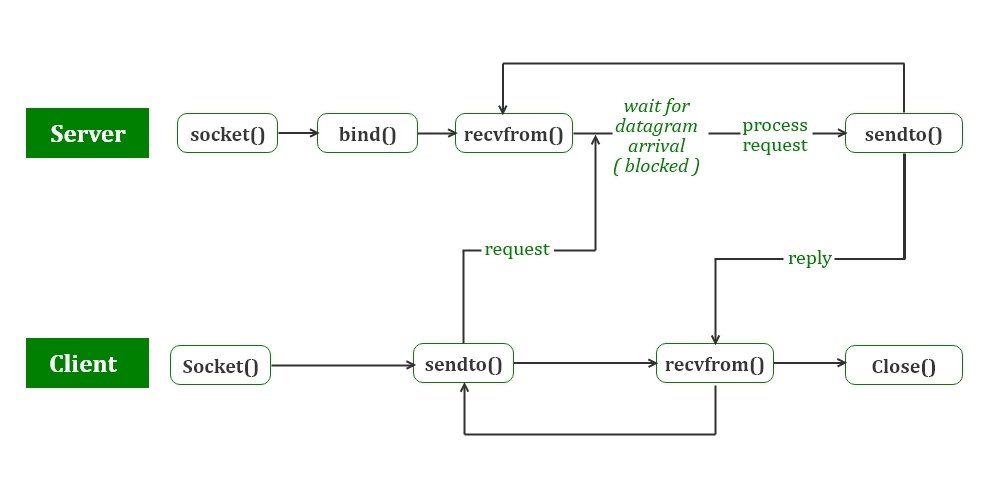
image
Image source: UDP Server-Client implementation in C
How the Server Works?
The listener works by creating a socket, binding it to a port, and waiting for incoming messages.
First, the listener creates a hints structure that contains the information needed to create the socket, such as the protocol family, socket type, and port number. It then calls the
getaddrinfo()function to get the address information, which is stored in theservinfolinked list.Then, the listener traverses the
servinfolinked list until it finds usable address information. It then creates a socket using thesocket()function. If successful, it returns the socket descriptor; if it fails, it returns -1.Next, the listener calls the
bindfunction to bind the socket to the specified port. This allows the listener to receive messages sent to that port.After the socket is successfully bound, the program listens for incoming messages from the
recvfromfunction. Therecvfromfunction blocks the program until a message is received, stores the message in thebufbuffer, stores the sender's address information intheir_addr, and finally prints the received message and the sender's IP address to the screen.Finally, the listener closes the socket and exits.
How the Client Works?
The talker works by setting up a socket, sending a message to the listener, and closing the socket.
First, the talker creates a hints structure to hold address information, such as the protocol family, socket type, and port number. It then calls the
getaddrinfo()function to get the address information, which is stored in theservinfolinked list.Then, the talker traverses the
servinfolinked list until it finds usable address information. It then creates a socket using thesocket()function. If successful, it returns the socket descriptor; if it fails, it returns -1.After successfully creating the socket, the talker calls the
sendto()function to send a message through the socket. If successful, it returns the number of bytes sent; if it fails, it returns -1.Finally, the talker closes the socket.
Server Demo
/*
** listener.c: a datagram sockets "server" demo - Datagram Socket Listener
** from Beej's Guide to Network Programming Using Internet Sockets
** https://beej.us/guide/bgnet/html/#datagram
*/

#include <stdio.h>
#include <stdlib.h>
#include <unistd.h>
#include <errno.h>
#include <string.h>
#include <sys/types.h>
#include <sys/socket.h>
#include <netinet/in.h>
#include <arpa/inet.h>
#include <netdb.h>

#define MYPORT "4950" /* The port users will be connecting to */
#define MAXBUFLEN 100 /* Max size of the datagram */

/* Get sockaddr, IPv4 or IPv6: */
void *get_in_addr(struct sockaddr *sa)
{
    if (sa->sa_family == AF_INET)
    {
        return &(((struct sockaddr_in *)sa)->sin_addr);
    }
    return &(((struct sockaddr_in6 *)sa)->sin6_addr);
}

int main(void)
{
    int sockfd;
    struct addrinfo hints, *servinfo, *p;
    int rv;
    int numbytes;
    struct sockaddr_storage their_addr;
    char buf[MAXBUFLEN];
    socklen_t addr_len;
    char s[INET6_ADDRSTRLEN];

    memset(&hints, 0, sizeof hints);
    hints.ai_family = AF_INET6; // use IPv6
    hints.ai_socktype = SOCK_DGRAM; // use UDP
    hints.ai_flags = AI_PASSIVE; // use my IP

    if ((rv = getaddrinfo(NULL, MYPORT, &hints, &servinfo)) != 0)
    {
        fprintf(stderr, "getaddrinfo: %s\n", gai_strerror(rv));
        return 1;
    }

    // loop through all the results and bind to the first we can
    for (p = servinfo; p != NULL; p = p->ai_next)
    {
        if ((sockfd = socket(p->ai_family, p->ai_socktype,
                             p->ai_protocol)) == -1)
        {
            perror("listener: socket");
            continue;
        }

        if (bind(sockfd, p->ai_addr, p->ai_addrlen) == -1)
        {
            close(sockfd);
            perror("listener: bind");
            continue;
        }

        break;
    }

    if (p == NULL)
    {
        fprintf(stderr, "listener: failed to bind socket\n");
        return 2;
    }

    freeaddrinfo(servinfo);

    printf("listener: waiting to recvfrom...\n");

    addr_len = sizeof their_addr;
    if ((numbytes = recvfrom(sockfd, buf, MAXBUFLEN - 1, 0,
                             (struct sockaddr *)&their_addr, &addr_len)) == -1)
    {
        perror("recvfrom");
        exit(1);
    }

    printf("listener: got packet from %s\n",
           inet_ntop(their_addr.ss_family,
                     get_in_addr((struct sockaddr *)&their_addr),
                     s, sizeof s));
    printf("listener: packet is %d bytes long\n", numbytes);
    buf[numbytes] = '\0';
    printf("listener: packet contains \"%s\"\n", buf);

    close(sockfd);

    return 0;
}
Client Demo
/*
** talker.c -- a datagram "client" demo - Datagram Socket Sender
** from Beej's Guide to Network Programming Using Internet Sockets
** https://beej.us/guide/bgnet/html/#datagram
*/

#include <stdio.h>
#include <stdlib.h>
#include <unistd.h>
#include <errno.h>
#include <string.h>
#include <sys/types.h>
#include <sys/socket.h>
#include <netinet/in.h>
#include <arpa/inet.h>
#include <netdb.h>

#define SERVERPORT "4950" // the port users will be connecting to

int main(int argc, char *argv[])
{
    int sockfd;
    struct addrinfo hints, *servinfo, *p;
    int rv;
    int numbytes;

    if (argc != 3)
    {
        fprintf(stderr, "usage: talker hostname message\n");
        exit(1);
    }

    memset(&hints, 0, sizeof hints);
    hints.ai_family = AF_INET6; // use IPv6
    hints.ai_socktype = SOCK_DGRAM; // use UDP

    if ((rv = getaddrinfo(argv[1], SERVERPORT, &hints, &servinfo)) != 0)
    {
        fprintf(stderr, "getaddrinfo: %s\n", gai_strerror(rv));
        return 1;
    }

    // loop through all the results and make a socket
    for (p = servinfo; p != NULL; p = p->ai_next)
    {
        if ((sockfd = socket(p->ai_family, p->ai_socktype,
                             p->ai_protocol)) == -1)
        {
            perror("talker: socket");
            continue;
        }

        break;
    }

    if (p == NULL)
    {
        fprintf(stderr, "talker: failed to create socket\n");
        return 2;
    }

    if ((numbytes = sendto(sockfd, argv[2], strlen(argv[2]), 0,
                           p->ai_addr, p->ai_addrlen)) == -1)
    {
        perror("talker: sendto");
        exit(1);
    }

    freeaddrinfo(servinfo);

    printf("talker: sent %d bytes to %s\n", numbytes, argv[1]);
    close(sockfd);

    return 0;
}
Potential Issues
Error handling: Both programs do not have robust error handling. For example, in the client program, if sendto returns an error, it just prints an error message and exits, rather than trying to recover from the error.
Timeouts: If the server is not running or if the message gets lost in transit, the client program will hang indefinitely, waiting for a response that never comes. It might be a good idea to set a timeout for the sendto and recvfrom calls to avoid this.
Limited message size: The programs only allow for messages of up to 100 bytes. If you need to send larger messages, you will need to split them into smaller chunks and send them separately.
Lack of security: The programs do not use any form of encryption or authentication, so anyone on the network can potentially intercept or forge messages. If you need to secure your communication, you should consider using TLS or SSH to encrypt the messages.
Compilation
gcc -o talker talker.c
gcc -o listener listener.c
Running and Output
./listener
# Listener waits until talker is run
listener: waiting to recvfrom...
# After running talker in another terminal, listener outputs:
listener: got packet from ::1
listener: packet is 5 bytes long
listener: packet contains "hello"

# Run talker in another terminal
./talker localhost hello
talker: sent 5 bytes to localhost
Summary
This article implements a simple UDP client and server program. The client program is called talker, and the server program is called listener.
Run the listener program, then run the talker program. The listener program will wait for a message from the talker program. When the talker program runs, it sends a message to the listener program, and the listener program prints this message.
If the listener program is not running, the talker program will send the message and then exit. These messages will be lost because there is no program to receive them.
The UDP protocol is a simple, lightweight protocol that is easy to use. However, it does not provide any error checking or recovery, and it does not guarantee delivery of messages to their destination, so it is not suitable for applications that require reliable communication.